AI Pixel Art Generator
Describe a character or a place, pick 16-bit, 8-bit or a pixel scene, and get pixel art drawn on a clean grid with flat colors. 2 credits a picture. Starting from a photo instead? Use image to pixel art.
Style
A full-body character from a 16-bit role-playing game, on a plain background.
Size
about 1 megapixel · 2 credits
3:4, set by the style
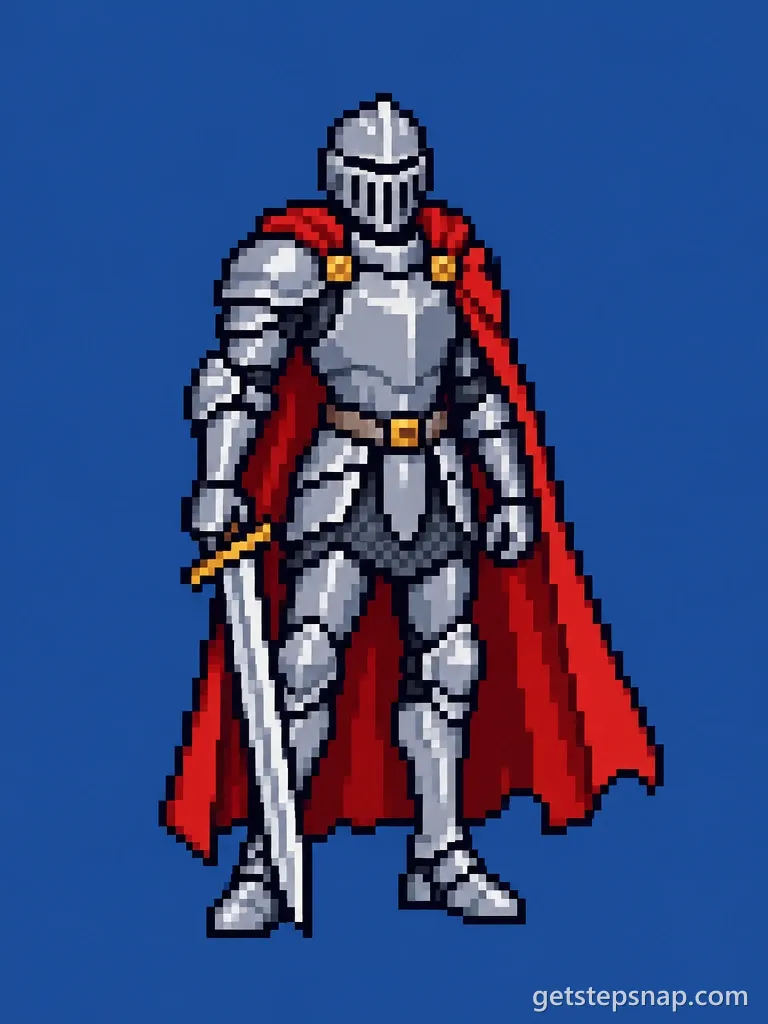
16-bit character, from the words "a knight in silver armor with a long red cape".
Your own image will show up here.
How to make pixel art from text
- Describe one character or one place in a sentence. Colors and clothes matter more than backstory.
- Pick a style: 16-bit character, 8-bit character or Pixel scene.
- Click Generate, then download the PNG. Scale it up with nearest-neighbor so the pixels stay square.
A free pixel art generator for pictures
Already have a picture? The free image to pixel art converter turns any photo, drawing or logo into pixel art in your browser: pick 16 to 128 blocks across and a color limit, add grid lines for perler beads, and download a PNG. No sign-in and no credits, and the picture never leaves your device. Use it when you want your exact picture, blocky; use the styles here when you want a character drawn from scratch.
The three styles
- 16-bit character: A full-body character from a 16-bit role-playing game, on a plain background.
- 8-bit character: A chunky 8-bit sprite with very few colors, like an early console game.
- Pixel scene: A wide 16-bit game scene or background, like a level from a classic platformer or RPG.
Descriptions that work
The best results come from short, concrete sentences. A few to start from, or to borrow pieces of:
- Fantasy: an elf ranger in a green hood with a short bow on her back; a dwarf blacksmith with a braided red beard and a leather apron.
- Sci-fi: a robot mechanic in orange overalls with one round blue eye; a space courier in a white suit and a cracked visor.
- Cozy: a shiba inu baker in a striped apron; a little cottage with a vegetable garden and a red mailbox, at sunset.
- Spooky: a friendly ghost wearing a tiny witch hat; a pumpkin-headed scarecrow in a patched coat.
Skip words like "beautiful" or "highly detailed": pixel art is about reading at a glance, and the style already sets the grid and the colors. If a result has one thing wrong, change only that part of the sentence and run it again.
A pixel character maker without the drawing
A pixel character maker usually hands you a grid and a palette, and you place every pixel yourself. That's the right tool when you know exactly what you want and have an afternoon. When you have an idea and five minutes, type it here: you get a whole character on an even grid, with an outline and flat colors, and you can still open it in a pixel editor and fix the bits you'd draw differently.
An 8-bit character generator
8-bit means the look of games from the early home consoles: a coarse grid about 32 pixels wide, a handful of colors and hard outlines, so a character reads at a glance even when it's tiny. Pick 8-bit character for avatars, retro thumbnails and game jam prototypes, where simple beats detailed.
Text to pixel art or image to pixel art?
Use this page when the character only exists in your head. If you have a photo, a drawing or a screenshot, image to pixel art keeps what's in it: a free converter for an exact blocky copy, and two AI styles that redraw a face as a 16-bit hero or a pixel avatar. To make your character move, take the result to the AI sprite sheet generator; for a cute version of yourself rather than pixels, there's the chibi maker.
AI pixel art generator FAQ
Is this AI pixel art generator free?
No: each picture takes 2 credits on OpenAI's GPT Image 2.5, and packs cost $11.90 for 20 credits or $32.90 for 70, paid once. The free tool on this site is the image to pixel art converter, which runs in your browser.
16-bit or 8-bit: which should I pick?
16-bit if you want detail, shading and up to about 20 colors, like a character from a 1990s role-playing game. 8-bit if you want chunky pixels and no more than 8 colors, like an early console game; it's also easier to redraw by hand.
How do I write a good description?
Name the character, then the two or three things that make it recognizable: colors, clothes, one item. "A frog wizard in a purple robe and pointed hat" works better than a paragraph about its backstory. You don't need to write "pixel art"; the style button adds that.
Can it write text or a game title in the picture?
No. The styles ask for no letters, because pixel lettering from an image model usually comes out garbled. Add your title in an editor afterwards.
Can I turn the character into an animation?
Yes. Download it, then upload it to the AI sprite sheet generator and pick an action such as Idle or Walk cycle.
Is the background transparent?
No. Characters come on one solid color, which a magic wand in any editor clears in a click.