AI Sign Generator
Type what the sign says, pick a kind of sign, and see it above a shop door, on a wedding easel, in a front lawn, or as a flat sign to print. It runs on MOSS Image, a new open-source model built for words in pictures. 1 credit a sign.
Style
A painted wooden sign above a shop door, photographed from across the street.
Size
about 1 megapixel · 1 credit
4:3, set by the style
Your image will show up here.
How to make a sign with AI
- Type the words exactly as they should read on the sign. 60 characters at most.
- Pick the sign: Shop sign, Welcome sign, Yard sign or Printable sign.
- Click Generate. The sign comes back in about 15 to 20 seconds and stays in your account.
- Check the spelling, then download the PNG to post, send or print.
The four signs
- Shop sign: A painted wooden sign above a shop door, photographed from across the street.
- Welcome sign: An acrylic welcome sign on an easel with white flowers, for a wedding, a party or a shower.
- Yard sign: A white yard sign on a wire stake in a front lawn, bold letters you can read from the street.
- Printable sign: A flat sign design the shape of a sheet of letter paper: big bold words, a border and one small icon.
A sign from a whole prompt
The buttons above only need the words. When you want more say over the scene, write the whole thing yourself. This one came from the prompt under it on the MOSS Image page, first try.
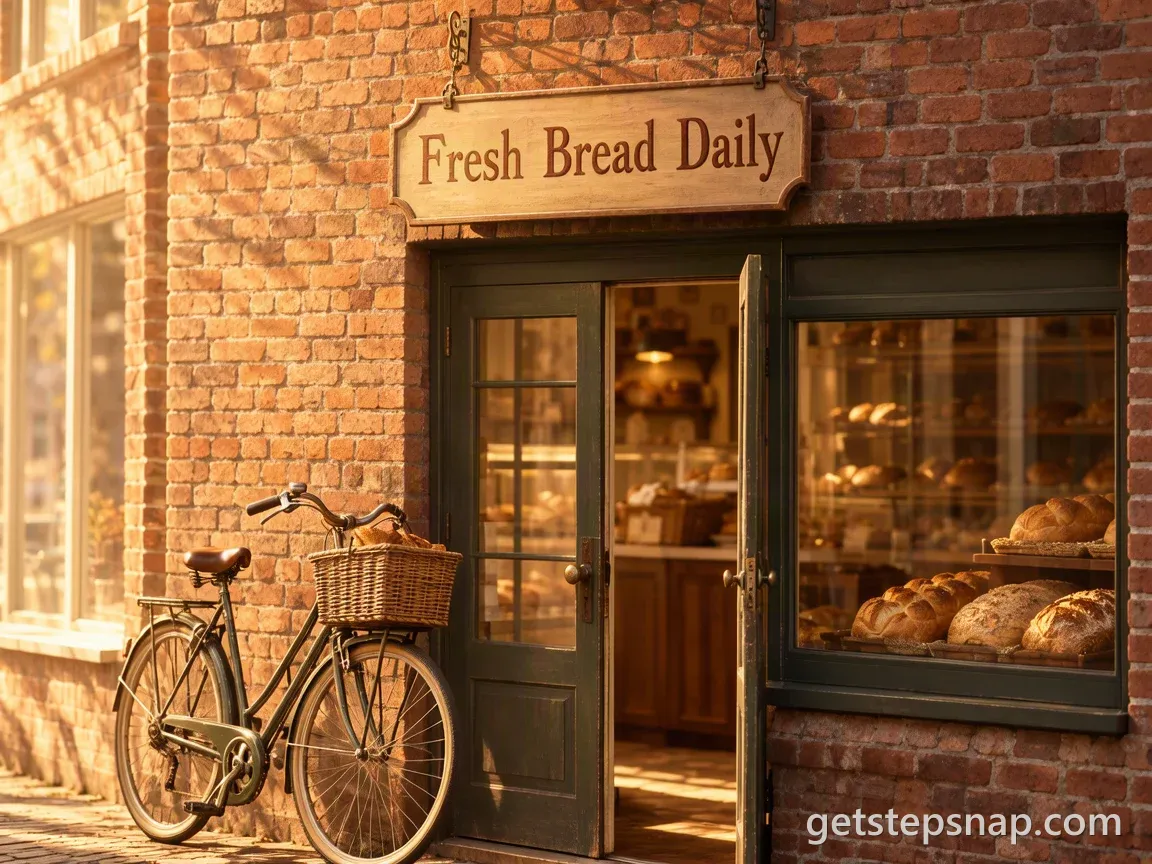
A hand-painted wooden sign above a small bakery door that reads "Fresh Bread Daily", soft morning light, a bicycle leaning against the brick wall
Change the words in quotes to your shop's, and the door, the light or the bicycle to whatever fits. More prompts like it, for posters and notes as well as signs, are in MOSS Image prompts.
What to put on a sign
- A shop: the name, and maybe one more line: "Rosie's Bakery", "Open late", "Coffee & books".
- A wedding or a party: "Welcome to the wedding of Ana & Leo", "Welcome to Emma's baby shower", "Happy 60th, Dad".
- A yard: "Garage Sale Saturday 8 AM", "Lemonade 50¢", "Slow down, kids at play".
- A sign to print: "Please take off your shoes", "Back in 10 minutes", "Restroom for customers only".
Fewer words read better from a distance, which is the whole point of a sign. If what you want is the words themselves as art, in brush script, neon or chalk, the AI lettering generator does that.
AI sign generator FAQ
Is this AI sign generator free?
No: each sign takes 1 credit, and packs cost $11.90 for 20 credits or $32.90 for 70, paid once, with no subscription. If an image fails, its credit goes back to your balance.
Can I print the sign?
Yes. The picture is about 1 megapixel (1152 by 864 pixels, or the other way round for the tall signs). Big bold words print fine on a sheet of letter paper at home, which is what the Printable sign is for. For a banner or a real yard sign, take the picture to a print shop as the design and have them set the words at full size.
What's the difference between the four signs?
Shop sign, Welcome sign and Yard sign show the sign where it would be: above a door, on an easel, in a lawn. They're for seeing how it looks, or for posting. Printable sign is a flat design with a border, the shape of a sheet of paper, to print and put up.
How much can a sign say?
Up to 60 characters. A name and one short line come out best. A sign that has to be read from across a street wants five words or fewer anyway.
Will it spell the sign right?
Usually. It runs on MOSS Image, a model built for words in pictures, and the button asks for every letter exactly as written. Check the result before you print, and run it again if a letter slips.
Can I add my logo?
Not on this page: it makes the sign from your words only, and it won't draw brand logos. For your own colors, objects or layout, write a whole prompt on the MOSS Image page.
Can I use the sign for my business?
We don't claim any rights to the images you make here: you may use them for personal or commercial purposes, subject to the law. Don't put a trademark you don't own on a sign.